
The MouthPad is a hands-free computer input device. For nearly two years, the MouthPad has been available in early access in which we have worked with approximately 150 people with a range of uses for the MouthPad to better understand where it can be impactful. Here we summarize some of those learnings.
The MouthPad enables hands-free computer control by using tongue gestures and, if the user is willing/able, head movements to generate mouse HID inputs (we’ll talk about keyboard inputs soon). Internally, we refer to these as “tongue control” and “head control”, even though both control modes make use of tongue gestures. Three types of tongue gestures are available as core gestures: (1) touching the trackpad, which reports tongue touch location, (2) tongue press, or pressing the tongue into the roof of the mouth to apply positive pressure and (3) sip, or applying negative pressure the way you would sip a beverage. In both modes, tongue press generates a left click and sip generates a right click. In tongue control mode, the tongue touch location controls a virtual joystick, moving the cursor in a particular direction and speed depending on the touch location (video demo here). In head control mode, the user’s head movements move the cursor (video demo here) and the tongue touch location controls virtual buttons to enable scrolling vertically and horizontally.
What are relevant alternative products for hands-free computer control? For computer access solutions today, most are categorized as assistive technologies that produce computer controls using a hands-free motor pathway: voice control, head trackers, switch based controls, eye trackers and others. Generally, assistive technologies suffer from three problems.
- Expressiveness. Today's computers require users to express fairly detailed commands, requiring both pointing and actions associated with the pointer. While various alternative pointing devices have been reasonably successful for people with hand impairments, many lack gestural capabilities to associate with the pointer location (e.g., clicking and scrolling). In this sense, it is difficult to match the expressiveness of even simple finger interfaces like a keyboard.
- Universality. Assistive technology users have a broad range of motor impairments, and actions available to one user may not be available to another. Or in the case of a progressive disease like ALS, solutions which work in the early state of the disease may not be feasible later.
- Augmentation. Assistive solutions must not impair or interfere with remaining natural motor functions. Instead, they must present as a new tool which is available to the user's motor capabilities only when they intend. For example, despite the speed of eye movements and high selection accuracy, eye movements are partially involuntary (e.g., looking in the direction of a loud noise) resulting in unintended actions for eye tracking users. Similarly, voice control makes it easy to express actions, but can misfire when other speakers are nearby or non-control speech of the user may cause inadvertent actions.
Neural interfaces such as brain-computer interfaces (BCIs) are an alternative strategy to address the limitations of assistive technologies in hands-free computer control. For at least 3 decades, academic researchers and now several companies have developed BCIs to bypass impaired neural pathways and enable a route for the brain to produce computer input signals for pointer and text. Many other BCI applications exist as well, e.g., control of an exoskeleton or functional electrical stimulation of a paralyzed limb, or closed-loop neuromodulation systems, but here we will narrowly interpret "computer" in BCI as desktop computer/smartphone rather than digital computation in the broad sense. By directly interfacing with the nervous system, these interfaces aim to bypass any impaired natural motor function, freeing them from the three problems that limit assistive technologies. However, today's highest performing BCIs involve brain surgeries of varying degrees of surgical invasiveness and are not commercially available.
The MouthPad was designed to be a tongue-first interface to overcome the limitations of traditional assistive technologies without requiring surgery. The tongue is well suited to fine motor tasks as one of its natural functions, articulation during speech, is a high-dimensional output that is both gestural and volitional. This makes it a potentially viable source of expressive outputs. Correspondingly, we have found intelligible speech to be a sufficient indicator that a person can learn to use the MouthPad, though it is not a stricly necessary condition as some non-verbal users have had success with the MouthPad. Many people with even severe hand impairments retain the required level of tongue dexterity to make the MouthPad a useful tool, enabling progress towards universality by working well with users with a broad range of needs. Tongue motor function is frequently retained after SCI as the brain directly ennervates the tongue through cranial nerves. Some head mobility is also relatively common as nerves ennervating the neck muscles exit the spinal cord at the very top (C1-C3). While people with cervical SCI do suffer voice alterations, tongue articulator placement resembles healthy speakers [1]. In ALS, tongue dexterity loss depends on the disease progression subtype. Spinal-onset ALS patients retained functional speech for 60 months post diagnosis, whereas with bulbar-onset speech (approximately 20-30% of ALS cases [2]) was typically unintelligble around 32 months [3]. The tongue is also naturally multi-function, being involved in speech as well as eating & drinking, which potentially enables a tongue interface to be augmentative - picked up when needed and dormant otherwise - rather than a source of interference.
For simplicity in this first discussion, we will begin by reporting user experience for head control users. Generally our users report that head control is faster than tongue control, in much the same way that moving a mouse is faster than pointing your cursor with a joystick [4]. We estimate that about a quarter of MouthPad users are primarily tongue control users, for a variety of reasons: head control may not be physically possible for some users, it may be inconvenient while lying on one's back (it works, but requires moving your head against a surface like a pillow or a bed), or environmental vibrations like being in a car can add noise to head control.
Point-and-click performance
Point and left click is the cornerstone of modern computer/smartphone interactions. As part of onboarding to the MouthPad, users were requested to perform a 1-minute grid click selection task to assess their MouthPad settings, and to record their scores on our game leaderboard if they wanted. This simple game is nominally the same as Neuralink’s version for comparison, and versions of the same game are commonly used in assessments of brain-computer interfaces [5].
58 people with hand impairments completed the 1-minute grid selection game and recorded scores. Hand impairment was due to a variety of conditions summarized in the table below. “Other” represents a combination users who either declined to state their precise hand impairment, as well as users whose impairment is known but unique among the participants.
| Condition | Tongue control users | Head control users | Total number of users |
|---|---|---|---|
| ALS | 2 | 1 | 3 |
| Spinal Cord Injury (SCI) | 4 | 23 | 27 |
| Quadriplegia (likely SCI but unstated) | 0 | 10 | 10 |
| Multiple Sclerosis | 1 | 1 | 2 |
| Muscular Dystrophy | 1 | 1 | 2 |
| Repetitive stress injury (RSI) | 3 | 3 | 6 |
| Other condition | 3 | 5 | 8 |
| Total | 14 | 44 | 58 |
Of these 58 users, 44 of them performed the onboarding assessment in head control mode. In addition, 23 nominally healthy individuals also participated in MouthPad tasks using head control. This included a mix of Augmental staff, external assistive technology professionals (ATPs) who work in the clinical setting to prescribe assistive devices to people with hand impairments, and HCI researchers developing hands-free computer interfaces. These users are highly experienced with alternative technologies for computer interaction, possibly leading them to perform better than a typical computer user.
Point and click performance in this task is measurable in bits per second (bits/sec) - each click metaphorically “communicates” bits. So in our 30x30 grid, each click communicates 9.81 raw bits. Errors like misclicks communicate the wrong raw bits. Like in any communication channel, the effective bitrate requires accounting for these errors. One way to do so is:
The concept of net trials per minute (NTPM) is a fairly conservative accounting of misclicks, as no “partial credit” is given for misclicks adjacent to the target [6]. While this quantifies performance, the numerical value lacks an intuitive mapping to functional capability. Just like how internet service sales staff need to translate the internet bitrate into the number of simultaenous streaming videocalls it supports, a video is worth a thousand words to understand what a 4 bits/sec point-and-click can poentially unlock. (Particularly since a rate of 4 bits/sec sounds absurdly slow compared to a home internet connection). Below is a video of the grid selection task from the onboarding of one hand-impaired MouthPad user, who achieves 4.25 bits/sec in his first attempt on the grid selection task after just one hour of using the MouthPad.
(The unfortunate lag between the cursor position and the highlighted square in the game is only an artifact of videocall recording). In our opinion, this level of performance (~4 bits/sec) unlocks many occupational use cases. While more bits/sec is always better, at this performance level some users may start to prefer additional input functionality (e.g., right click, scroll, keyboard shortcuts) over improvements in point-and-click bitrate.
How does the MouthPad compare to point-and-click BCIs and other assistive technologies? In the table below we report and compare max performance as well as “typical” performance against point-and-click BCIs. Maximum performance demonstrates what the interface is capable of. Typical performance reflects what a user should expect when they purchase a device. Specifically in the case of the MouthPad, this is typical initial performance, as most users perform the assessment only once as part of onboarding. For the handful of users who performed the assessment more than once, we report only their maximum score in this table.
| Study | Interface | User population | Control signals | Number of participants | Selection rate [bits/sec] | ||
|---|---|---|---|---|---|---|---|
| Typical | Typicality measure | Max | |||||
| This study | MouthPad | Hand impaired (Table 1) | Head movement and tongue gestures | 44 | 3.43 | Cross-user median | 10.63 |
| Typically-abled subjects | Head movement and tongue gestures | 23 | 4.58 | Cross-user median | 9.98 | ||
| PRIME | Neuralink N1 | SCI | Single/multi unit micro-electrode recordings | 1 - single user longitudinal data [7] | 6.2 | Longitudinal median | 9.51 |
| Neuralink N1 | SCI, ALS | Single/multi unit micro-electrode recordings | >21 [8] | not available at time of writing | — | 10.39 | |
| BrainGate2 [9] | Blackrock array | ALS | Single/multi unit micro-electrode recordings | 3 | 2.2 | Cross-user mean | 4.6 |
| SWITCH [10,11] | Synchron Stentrode | ALS | Endovascular field potential + eye movements | 4 | 1.371 | Cross-user mean | 4.04 [11] |
The maximum performance of the highest scoring MouthPad user exceeds any of the other interfaces. 36% of MouthPad users score higher than 4.25 bits/sec, the bitrate shown in the video above, which is a level which is likely sufficient for real-world occupational and casual computer use. Two MouthPad users exceeded 10.4 bits/sec. About 16% of MouthPad users exceeded 7 bits/sec, which is faster than some typically-abled computer users on a laptop trackpad.
What about other BCI outputs? Many BCI researchers have moved on from cursor control to other future-looking technologies like decoding speech [12–14], handwriting [15], or keyboard touch typing [16]. The words/characters per minute reported by those studies could be compared in terms of bits/sec. But doing so requires knowing the entropy of the words used in decoding - clicking random targets in a grid is a reasonably realistic simulation of some computer tasks, but generating random sequences of letters or words is not representative of typical text input to a computer. Participants in those studies are using BCI for language output because of difficulties producing intelligible speech. While decoding performance is very impressive and encouraging for those users, the output rate typically falls short of spoken language speed. In contrast, nearly all MouthPad users can nearly all speak - perhaps with some volume impairment or altered phonation but is intelligible. Rather than trying to match those impressive language BCIs with the MouthPad, we instead designed VOX to meet our users where they are and translate quiet, body-conducted speech into text.
How does the MouthPad compare to other assistive technologies? To make this comparison, we must make a slight detour into the details of the performance metrics. Published results in alternative pointing devices tend to use a Fitts’ law measure of bits per second:
This is an empirical relationship, based on the seminal work of Fitts [17], in which he found that the speed of arm movements to reach targets of a width W at a distance D mimicked the channel capacity curve from information theory. While this is an empirical finding and no mathematical derivation really underpins the precise formula, HCI researchers have shown that the curve tends to hold up in a variety of contexts in computer use, including mouse pointing performance.
Unfortunately, Fitts' bits/sec is actually a different unit than the selection rate bits/sec. For a one-dimensional grid of targets, if D is the total width of the grid (the furthest reach in the task) and all the targets are the same width W, then the two formulas are approximately equal. However, Fitts' law's index of difficulty only measures the one-dimensional axis of movement. This undercounts the total bits transferred in a 2D "communication channel". So in order to compare the MouthPad against assistive technologies, where the standard is Fitts' bits/sec measured on the ISO 9241-9 task, we have to use this alternative measure.
In the grid selection task, we can measure for each individual trial the Fitts' index of difficulty and so we measured both selection rate bits/sec and Fitts’ bits/sec. Consistent with the math, we find that the two measures are highly linearly correlated, but that Fitts’ law bits/sec underscores the selection rate bits/sec by about 60%. We can mathematically reproduce this loss of information by applying a simple model to convert our 2D grid task into a 1D task, which gives us confidence in the validity of the comparison.
The table below shows a comparison of the MouthPad against camera-based head-trackers, eye trackers and other intra-oral tongue-based interfaces (unlike the MouthPad, these tongue interfaces typically require a magnet glued to the tongue or a piercing). The BRAVO study [18] is an implanted BCI but reports performance in Fitts’ bits/sec, so we include it in the table as well.
| Study | Interface | User population | Control Modality | # of users | Reaching throughput [Fitts' bits/sec] | ||
|---|---|---|---|---|---|---|---|
| Typical | Typicality measure | Max | |||||
| This study | MouthPad | Hand impaired (Table 1) | Head movement and tongue gestures | 44 | 1.335 | Cross-user median | 4.1 |
| Typically-abled subjects | Head movement and tongue gestures | 23 | 1.8 | Cross-user median | 3.78 | ||
| BRAVO [18] | ECoG array | Brainstem stroke | ECoG field potentials | 1 | 0.4 | Longitudinal mean | 0.5 |
| Bian et al, 2016 [19] | Kinect depth camera | Typically-abled subjects | Head movements & facial gestures | 16 | 3.26 | Cross-user mean | 3.52 |
| Kim et al, 2013 [20] | Tongue piercing + external sensor | SCI | Tongue movements | 11 | 0.72 | Cross-subject mean | 1.13 |
| Caltenco et al, 2014 [21] | Tongue adhered magnet + hard palate (retainer) sensor | Typically-abled subjects | Tongue movements | 4 | 0.77 | Cross-subject mean | 0.78 |
| ChinMotion [22] | Chin-mounted IMU + stretch sensor | SCI | Chin and tongue movements | 8 | 0.55 | Cross-subject mean | 0.62 |
| Pereira et al, 2009 [23] | Camera + head-mounted marker | C3-C5 SCI | Head movements (dwell select) | 10 | 0.75 | Cross-subject mean | 0.872 |
| MacKenzie, 2012 [24] | Eye tracker | Typically-abled subjects | Eye movements | 16 | 3.06 | Cross-user mean | 3.52 |
The max performance of the MouthPad is the highest of the assistive devices surveyed. But at least for typically-abled subjects in laboratory conditions, the typical performance of a camera-based head tracker / eye tracker exceeds that of the MouthPad. Applying the same conversion factor between the selection rate bits/sec and Fitts’ bits/sec to the other BCI studies (reasonably valid for Neuralink’s assessment task, which is the same as ours, but probably less precise for the other studies), we estimate that all the implanted point-and-click BCIs have the same performance shortcoming. This does not mean that head trackers and eye trackers are the best interface. Rather, it indicates that those devices likely fail to meet the users where they are: not portable, lacking discrete gestural outputs, and fatigue inducing (for eye-trackers in particular). Which is why despite their high point-and-click performance the search continued for novel hands-free computer interfaces.
Setup and other relevant human factors
All hand-impaired MouthPad users who contributed data to this study were onboarded in their home environment, either through videocall or with a self-guided option. Typical onboarding took less than 2 hours, after which users were able to achieve basic point and click functionality. As expected by design, users were able to to use the MouthPad in a variety of body postures (sitting, supine, side-lying) and in a variety of environments (e.g., home, classroom) due to its portable nature.
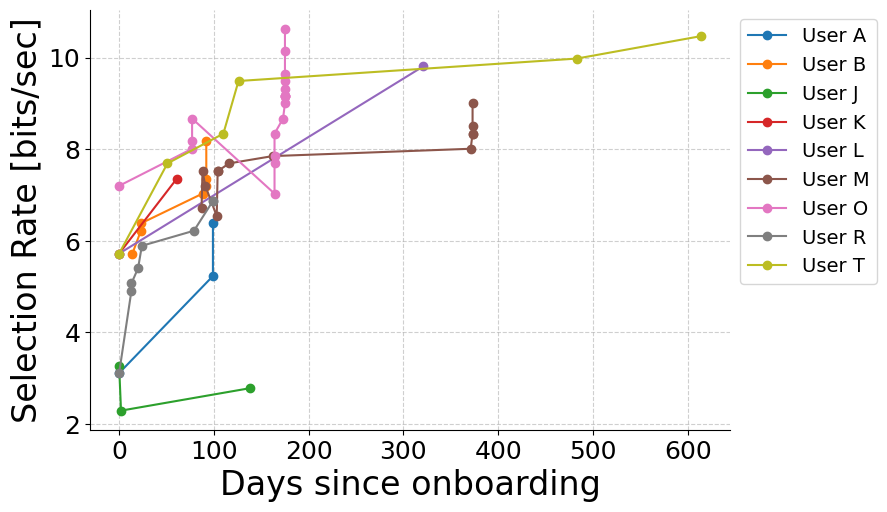
Of 34 users who performed the assessment on the first day after having received the mouthpad, they achieved a median of 3 bits/sec on their first day of use. And 5 out of 34 users achieved greater than 5 bits/sec, which is likely past the threshold for occupationally useful output. While most users performed the assessment only once during their remote onboarding, several users self-selected to perform the assessment multiple times. Typically performance improved with practice, and while various bugfixes were released to users over some of the longer timespans, we primarily credit the improvements to learning on the part of users.
Usage time varies across MouthPad users. For privacy, the MouthPad system does not track any device usage stats of Early Access customers. Our understanding of MouthPad usage instead comes from talking to users in the process of developing and deploying new features as well as customer service. Many users are daily users, relying on the MouthPad's capabilities for employment and education. Other users are more occasional users, enjoying its real-world portability both in its ability to function in any location without setup as well as its convenience in connecting to smartphones.
In communications with the Augmental team, MouthPad users report the ability to use the device while lying down as one of the most valued attributes of the MouthPad. Particularly for people who are forced to lie down for long periods of time for their health (e.g., to avoid pressure sores due to constantly sitting upright), this can be immensely valuable as few assistive solutions work well with changing body orientation. The majority of portability issues reported by Early Access users were primarily related to noisy wireless enviroments (e.g., classrooms), where often adjustments of OS-level settings and/or the use of dongles is able to alleviate the problem.
Gesture-triggered shortcuts
The MouthPad provides a robust pointing and clicking interface. The static gesture-to-action mapping provides all the pointing capabilities and switches of a standard mouse - left click, right click and scroll up/down - using tongue gestures. However, dexterously performing daily computing activities requires keyboard shortcuts - even able bodied users experience fatigue if they must perform all computer actions through pointing alone.
If you think of keyboard shortcuts as bimanual hand poses forced onto a 2D plane, they are gestures. Even forced onto a 2D plane, the hand is a high-dimensional gestural output. We considered 3 avenues for expanding the gestural dimensionality of the MouthPad to be closer to that of the hand:
- Composition of gestures: Perform more than 1 gesture simultaneously and map it to a different action than either gesture alone. Devices like the quadstick enable this for the sip and puff channels, enabling for example 3 puff channels to output up to 6 actions depending on whether 1, 2 or 3 channels are activated.
- Sequences of gestures: If a gesture such as press or sip is mapped to a state change rather than an action, then a sequence like touch → sip → touch can enable the same touch gesture to output two distinct and unrelated actions.
- Profiles: Once sequences of gestures can be used to trigger mouse and keyboard actions, 2 degrees of freedom plus a contextual switch are sufficient to generate any mouse or keyboard action. This is intuitively observable by the fact that a laptop keyboard and trackpad are in a 2D plane. However, while two degrees of freedom enables mouse/key inputs can be generated, it may require inconveniently long gestural sequences. Through the use of different profiles, the user can explicitly select sequence configurations which assigns shorter sequences of gestures to the most common actions required in their current use context.
The core user interaction we design around is a context menu. The menu can be activated from either the head control or the tongue control profile by remapping the sip gesture, to open the context menu on-screen. This context menu is controlled by the companion app and therefore only available on windows and macOS. An example menu is shown below. Once open, it provides on-screen visual feedback of the tongue touch location to implement virtual buttons. The tongue touch gestures, which have specific default actions in the standard mouse profile, are now remapped to a virtual button selection action based on the sequence of gestures and the profile which controls how that sequence is interpreted. Certain profile states also allow composing head movements with tongue touch gestures, which is particularly useful in gaming applications (see below).
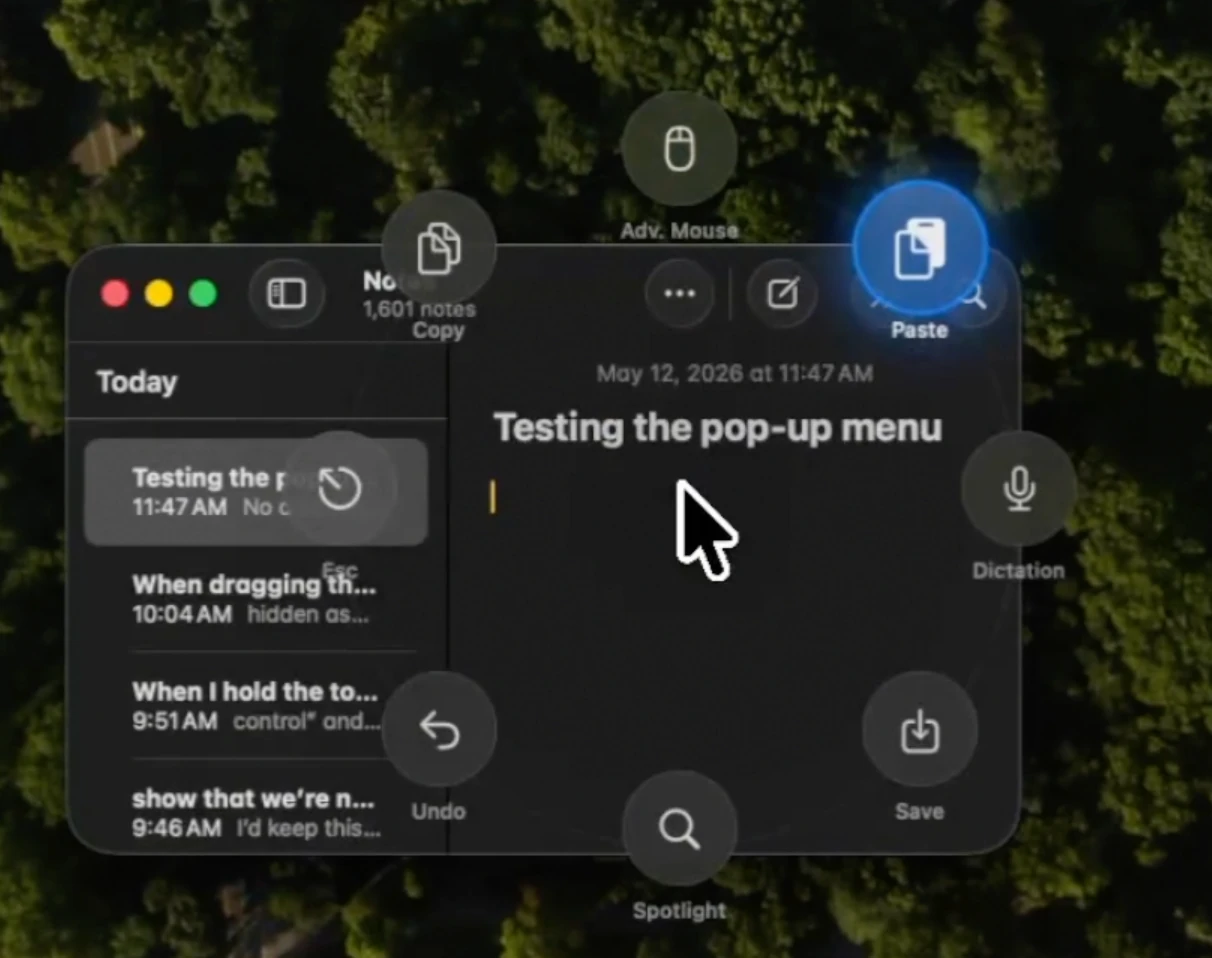
The use of a context switch, aided by a discrete gesture and the on-screen visual feedback, simplifies the design of the capacitive trackpad compared to the tongue magnet-sensing retainer design of [25], in which virtual button presses for keystrokes require an entirely different sensing area from the mouse area. With a state switching gesture, the same touch can be either mouse or key depending on the gesture sequence.
In a small subset of the typically-abled MouthPad users, we quantified the bitrate of the tongue gestures to quantify the usability of the gestural interface. We first measured the bitrate of the tongue touch gesture underlying the virtual menu button selection (video illustration). Typical selection rates were ~2.14 bits/sec among typically-abled MouthPad users, similar to other comparable tongue-only selection rate interfaces. Similarly, experienced MouthPad users generated an output of ~1 bits/sec with the press/sip gesture (video illustration), consistent with measurements of sip and puff devices which have a similar mechanism of action.
| Study | Interface | User population | Control Modality | # of users | Selection rate [bits/sec] | ||
|---|---|---|---|---|---|---|---|
| Typical | Typicality measure | Max | |||||
| This study | MouthPad | Typically-abled subjects | Tongue touch and release | 8 | 2.1465 | Cross-user median | 3.3 |
| TongueBoard [26] | CompleteSpeech SmartPalate | Typically-abled subjects | Silent articulations of words | 4 | 2.18 | Cross-user | not reported |
| Andreasen Struijk et al, 2017 [25] | Tongue piercing + magnetic sensor | Typically-abled subjects | Tongue movements | 2 | 3.53 | Cross-user median | 4.04 |
| This study | MouthPad | Typically-abled subjects | Tongue press/sip | 6 | 1.04 | Cross-user median | 1.583 |
| Kim et al 2013 [20] | Sip and puff | SCI | Breath inhale/exhale | 11 | 0.5 | Cross-user mean | 0.692 |
The reasonable bitrates from the press/sip gesture in isolation as well as the tongue touch gesture in isolation suggest that sequences of these gestures can be performed without inducing user frustration. This enables them to be chained in sequence to enable arbitrary computer mouse/keyboard inputs. For head control users, the tongue gestures provide an additional 3 gestural degrees of freedom in addition to the two degrees of freedom of head movements used for pointer control. We explore next whether this additional discrete gestural bitrates can augment the demonstrated head control bitrate with functionally useful capabilities.
Real-world computer use with the MouthPad gestural interface
The above gestural profile interface is now available in the MouthPad companion app for Windows and macOS. Over the last few months, we have been beta testing with several hand-impaired MouthPad users to refine the interface. Here we show a few examples of how the profiles may enhance the MouthPad user’s experience.
Keyboard shortcuts for office work
In this profile, the radial context menu provides quick access to common shortcuts like dictation (many MouthPad users are also voice input users), copy and paste without needing to aim with precision at a right-click context menu or an on-screen keyboard.
First-person shooter game with “dual joystick” control
In this profile, head movements and tongue touch work together to control a video game character in 4 degrees of freedom, equivalent to a computer mouse + WASD. The head movements control the aim location via the mouse and the tongue movements generate WASD to move in the virtual world.
Mechanical CAD
In this CAD-specific profile, shortcuts in the context menu enable the user to trigger keyboard shortcuts for pan, orbit and zoom while letting head movements control the mouse to perform the selected translation/rotation.
While these real world demonstrations are difficult to quantify in a single bits/sec measurement, they demonstrate th functional value addition of gestural shortcuts added to the MouthPad
Limitations of the MouthPad
The MouthPad, while extremely powerful, is not for everyone. As an intra-oral device, it is incompatible with certain dental treatments like Invisalign or braces. The core interface being a tongue interfaces requires some tongue dexterity, which may be impaired in conditions like macroglossia or severe dysarthria. Though there are some non-verbal MouthPad users, typically the ability to produce intelligible speech is a good proxy for whether a potential user has sufficient tongue control to make use of the powerful interface.
Integrating with VOX for text input
The quantiative data demonstrates that the MouthPad is a powerful mouse replacement. The gestural profiles add functions typically performed by keyboard shortcuts. What about text input? As an assistive technology for text input, voice control or dictation is a common choice. In the 2021 update to the National SCI statistical center database of traumatic spinal cord injury cases, voice control was the most common assistive technology used by cervical SCI survivors [27]. Accounting for continuing advances in machine learning for speech recognition, we expect the use of voice control has only expanded since 2021. When a user can speak, speech-to-text is often the fastest option, even for experienced keyboard typists.
What are some of the problems with voice control? It’s not private if you have to speak audibly or perhaps even shout over the noise. Other users voices may leak in resulting in your computer following the commands of others or dictating speech you don’t want dictated. These problems inspired the design for VOX. As a microphone engineered to pick up low-volume, body-conducted speech, it is excellent at hearing low-volume speech from the user even in noisy environments. When paired with the MouthPad’s explicit input to start and stop dictation and correct dictation errors (a frustrating task without a mouse and keyboard), the two together form an efficient, private mouse and keyboard replacement.
VOX + MouthPad interactions are being actively developed as we work to fulfilling VOX Batch 1 orders - more to come soon!
References
- MacBean N, Ward E, Murdoch B, Cahill L, Solley M, Geraghty T. Characteristics of speech following cervical spinal cord injury. J Med Speech - Lang Pathol. Delmar Learning; 2006 Sept 1;14(3):167–185.
- Simonds, Anita K. “Progress in Respiratory Management of Bulbar Complications of Motor Neuron Disease/Amyotrophic Lateral Sclerosis?” Thorax 72, no. 3 (2017): 199–201. https://doi.org/10.1136/thoraxjnl-2016-208919.
- Eshghi, Marziye, Yana Yunusova, Kathryn P. Connaghan, et al. “Rate of Speech Decline in Individuals with Amyotrophic Lateral Sclerosis.” Scientific Reports 12, no. 1 (2022): 15713. https://doi.org/10.1038/s41598-022-19651-1.
- H. Pedersen, R. F. Refvik, J. S. Uy, and F. E. Sandnes, “Joystick versus Mouse in First Person Shooters: Mouse Is Faster than Joystick,” in Human Interaction and Emerging Technologies, T. Ahram, R. Taiar, S. Colson, and A. Choplin, Eds., Cham: Springer International Publishing, 2020, pp. 378–382. doi: 10.1007/978-3-030-25629-6_58.
- Nuyujukian, Paul, Joline M. Fan, Jonathan C. Kao, Stephen I. Ryu, and Krishna V. Shenoy. “A High-Performance Keyboard Neural Prosthesis Enabled by Task Optimization.” IEEE Transactions on Biomedical Engineering 62, no. 1 (2015): 21–29. https://doi.org/10.1109/TBME.2014.2354697.
- S. M. Perkins et al., “SONIC: A Benchmarking Paradigm for Brain-Computer Interfaces”, https://doi.org/10.1101/2025.09.30.679683
- Neuralink, “PRIME Study Progress Update — User Experience,” Neuralink Blog. Accessed: Jan. 21, 2025. [Online]
- https://www.reuters.com/legal/litigation/elon-musks-neuralink-says-it-has-21-participants-enrolled-trials-2026-01-28/
- C. Pandarinath et al., eLife, vol. 6, p. e18554, Feb. 2017
- P. Mitchell et al., “Assessment of Safety of a Fully Implanted Endovascular Brain-Computer Interface for Severe Paralysis in 4 Patients: The Stentrode With Thought-Controlled Digital Switch (SWITCH) Study,” JAMA Neurol, vol. 80, no. 3, p. 270, Mar. 2023, doi: 10.1001/jamaneurol.2022.4847.
- T. J. Oxley et al., “Motor neuroprosthesis implanted with neurointerventional surgery improves capacity for activities of daily living tasks in severe paralysis: first in-human experience,” J NeuroIntervent Surg, vol. 13, no. 2, pp. 102–108, Feb. 2021, doi: 10.1136/neurintsurg-2020-016862.
- Card NS, Wairagkar M, Iacobacci C, Hou X, Singer-Clark T, Willett FR, Kunz EM, Fan C, Nia MV, Deo DR, Srinivasan A, Choi EY, Glasser MF, Hochberg LR, Henderson JM, Shahlaie K, Brandman DM, Stavisky SD. An accurate and rapidly calibrating speech neuroprosthesis [Internet]. medRxiv; 2024 [cited 2025 Aug7]. p. 2023.12.26.23300110. Available from: https://www.medrxiv.org/content/10.1101/2023.12.26.23300110v2
- Metzger SL, Littlejohn KT, Silva AB, Moses DA, Seaton MP, Wang R, Dougherty ME, Liu JR, Wu P, BergerMA, Zhuravleva I, Tu-Chan A, Ganguly K, Anumanchipalli GK, Chang EF. A high-performance neuroprosthesis for speech decoding and avatar control. Nature. 2023 Aug;620(7976):1037–1046. PMCID:PMC10826467
- Willett FR, Kunz EM, Fan C, Avansino DT, Wilson GH, Choi EY, Kamdar F, Glasser MF, Hochberg LR, Druckmann S, Shenoy KV, Henderson JM. A high-performance speech neuroprosthesis. Nature. Nature Publishing Group; 2023 Aug;620(7976):1031–1036.
- F. R. Willett, D. T. Avansino, L. R. Hochberg, J. M. Henderson, and K. V. Shenoy, “High-performance brain-to-text communication via handwriting,” Nature, vol. 593, no. 7858, pp. 249–254, May 2021, doi: 10.1038/s41586-021-03506-2.
- J. J. Jude et al., “Restoring rapid natural bimanual typing with a neuroprosthesis after paralysis,” Nat Neurosci, pp. 1–10, Mar. 2026, doi: 10.1038/s41593-026-02218-y.
- P. M. Fitts, “The Information Capacity of the Human Motor System in Controlling the Amplitude of Movement”.
- D. B. Silversmith et al., “Plug-and-play control of a brain–computer interface through neural map stabilization,” Nat Biotechnol, vol. 39, no. 3, pp. 326–335, Mar. 2021, doi: 10.1038/s41587-020-0662-5.
- Bian et al, 2016, IEEE Journal of Biomedical and Health Informatics 20, no. 3 (May 2016): 915–24
- J. Kim et al., “The Tongue Enables Computer and Wheelchair Control for People with Spinal Cord Injury,” Sci Transl Med, vol. 5, no. 213, p. 213ra166, Nov. 2013, doi: 10.1126/scitranslmed.3006296.
- H. A. Caltenco, B. Breidegard, and L. N. S. Andreasen Struijk, “On the tip of the tongue: learning typing and pointing with an intra-oral computer interface,” Disability and Rehabilitation: Assistive Technology, vol. 9, no. 4, pp. 307–317, Jul. 2014, doi: 10.3109/17483107.2013.823629.
- F. Galán, S. N. Baker, and M. A. Perez, “ChinMotion Rapidly Enables 3D Computer Interaction after Tetraplegia,” Jun. 08, 2016, arXiv: arXiv:1606.02711. doi: 10.48550/arXiv.1606.02711.
- C. A. M. Pereira, R. B. Neto, A. C. Reynaldo, M. C. de Miranda Luzo, and R. P. Oliveira, “Development and Evaluation of a Head-Controlled Human-Computer Interface with Mouse-Like Functions for Physically Disabled Users,” Clinics (Sao Paulo), vol. 64, no. 10, pp. 975–981, Oct. 2009, doi: 10.1590/S1807-59322009001000007.
- MacKenzie, I. S, Evaluating eye tracking systems for computer input. Gaze interaction and applications of eye tracking: Advances in assistive technologies, pp. 205-225, 2012
- Andreasen Struijk LNS, Bentsen B, Gaihede M, Lontis ER. Error-Free Text Typing Performance of an Inductive Intra-Oral Tongue Computer Interface for Severely Disabled Individuals. IEEE Trans Neural Syst Rehabil Eng Publ IEEE Eng Med Biol Soc. 2017 Nov;25(11):2094–2104. PMID: 2854121337.
- R. Li, J. Wu, and T. Starner, “TongueBoard: An Oral Interface for Subtle Input,” 2019.
- Chen, Yuying. National Spinal Cord Injury Model Systems Database. Version 2021ARPublic. Birmingham, AL: National Spinal Cord Injury Statistical Center. https://doi.org/10.17605/OSF.IO/NP24C. Accessed May 1, 2026.